Amazon blocked SportsFire direct install — Use NoroFire code 7446077 to install it. Full Guide →
Free Live Sports Streaming 2026

Watch Live Sports Free on FireStick & Android TV

SportsFire streams live sports channels from the US, UK, India, Australia, Italy & more — NFL, NBA, Premier League, UFC, Formula 1, cricket and tennis — all completely free, with minimal buffering.

Since Amazon blocked SportsFire, use NoroFire (code 7446077) to install it instantly on any Fire TV device.

Free to Use No Sign-Up HD Streams 150+ Channels
Ver 2.0.3 Free
SportsFire App Icon
SportsFire
Live Sports · Free · No Ads
150+
Channels
15+
Sports
HD
Quality
SportsFire Streaming App Interface
Fire TV Stick
All models
Android TV
Built-in TV
TV Box
Any Android box
Google TV
Chromecast & more
What Is SportsFire?

Free Live Sports on Your Big Screen

SportsFire TV APK is a free streaming app that brings live sports channels from over 15 countries straight to your TV — no subscription required, no account needed.

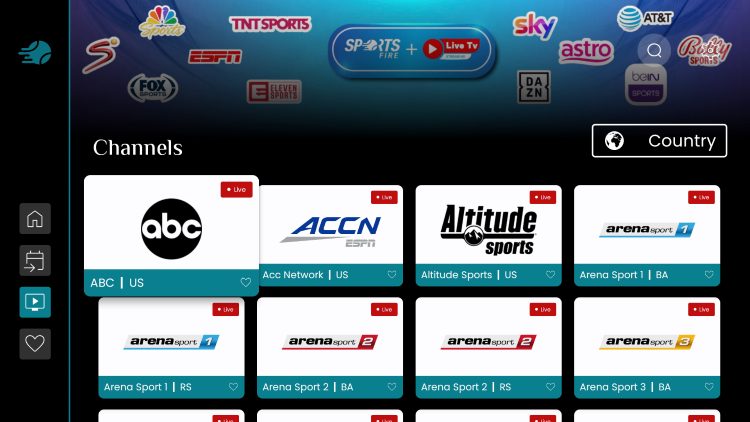
150+ Live Sports Channels — ESPN, Fox Sports, CBS Sports, BT Sport, Sky Sport Italia, JioCinema and more, all streaming live 24/7.
Match Schedules & Results — Stay up to date with ongoing match schedules, live scores, and results from every major league.
Watchlist Feature — Save your favourite channels and events to a personal watchlist so you never miss a match.
Multi-Device Support — Works on Fire TV Stick (all models), Android TV boxes, Google TV, Chromecast and Android phones.
VPN Recommended: SportsFire may fetch streams from third-party sources. For secure streaming, we recommend using Proton VPN on your device.
App Features

Everything You Need for Live Sports

SportsFire is built for sports fans who want a simple, reliable, and remote-friendly way to watch their favourite events on any screen.
Lag-Free Live Streaming
Minimal buffering with multiple stream sources per channel, so you always find a working, high-quality link.
SD, HD & Full HD Quality
Stream in Standard Definition, HD 720p or Full HD 1080p depending on your internet speed and available sources.
Watchlist & Favourites
Add channels to your personal watchlist so your favourite sports content is always just one click away.
Live Match Schedules
View upcoming fixtures and live match schedules directly inside the app so you never miss a kick-off.
Remote-Friendly UI
Clean, simple interface designed for TV remote navigation. No mouse or touchscreen required — perfect for the big screen.
International Channels
Sports channels from the US, UK, India, Australia, Italy, Spain and more — all in one app, completely free.
SportsFire App Home Screen
SportsFire Channels from Different Countries
SportsFire on Fire TV Stick
Sports Coverage

All the Sports You Love

From American football to cricket, SportsFire covers every major sport across the globe with live channels and event coverage.

NFL
NBA
Soccer
NHL
MLB
Cricket
Tennis
UFC / MMA
Formula 1
WWE
Athletics
Volleyball
Golf
Cycling
Swimming
AFL / Rugby
Channel Lineup

Top SportsFire Channels

Access premium sports channels from the world's biggest broadcasters — all free, all live.

ESPN
🇺🇸 United States
ESPN2
🇺🇸 United States
Fox Sports
🇺🇸 United States
CBS Sports
🇺🇸 United States
NBC Sports
🇺🇸 United States
NBA TV
🇺🇸 United States
NFL Network
🇺🇸 United States
MLB Network
🇺🇸 United States
TNT Sports
🇺🇸 United States
WWE Network
🇺🇸 United States
BT Sport 1
🇬🇧 United Kingdom
BT Sport 2
🇬🇧 United Kingdom
BT Sport 3
🇬🇧 United Kingdom
ITV Sport
🇬🇧 United Kingdom
Sky Sports Main
🇬🇧 United Kingdom
Sky Sports PL
🇬🇧 United Kingdom
TNT Sports UK
🇬🇧 United Kingdom
BBC Sport
🇬🇧 United Kingdom
JioCinema Sports
🇮🇳 India
Star Sports 1
🇮🇳 India
Star Sports 2
🇮🇳 India
Sony Sports
🇮🇳 India
Colors Cineplex Sports
🇮🇳 India
Fox Sports AU 501
🇦🇺 Australia
Fox Sports AU 502
🇦🇺 Australia
Fox Sports AU 503
🇦🇺 Australia
Kayo Sports
🇦🇺 Australia
beIN Sports AU
🇦🇺 Australia
Sky Sport Italia
🇮🇹 Italy
DAZN Italy
🇮🇹 Italy
Mediaset Sport
🇮🇹 Italy
Rai Sport
🇮🇹 Italy
Movistar Deportes
🇪🇸 Spain
DAZN España
🇪🇸 Spain
beIN Sports España
🇪🇸 Spain
Teledeporte
🇪🇸 Spain

View the full channel list →

Downloader App
NoroFire Downloader Code
7446077
Enter this code in the Downloader app
on your FireStick or Android TV
Or visit directly
norofire.com
How to Install via NoroFire

Install SportsFire in 5 Easy Steps

Amazon blocked the direct install of SportsFire from its Appstore. NoroFire is the official solution — it's a lightweight installer app that downloads and installs SportsFire on your behalf.

1
Enable Unknown Sources on FireStick
Settings → My Fire TV → Developer Options → Turn on Apps from Unknown Sources
2
Install the Downloader App
Search "Downloader" in the Amazon Appstore and install it (free app by AFTVnews)
3
Enter Code 7446077
Open Downloader, tap the URL field and enter the code 7446077 OR type norofire.com, then click Go
4
Install NoroFire
When NoroFire APK downloads, tap Install. Once done, open NoroFire.
5
Install SportsFire & Stream
In NoroFire, select SportsFire and tap Install. Open SportsFire and enjoy live sports!
Full FireStick Guide
Installation Guides

Install SportsFire on Your Device

Step-by-step guides for every device. Pick your device below and follow the instructions.

1
Enable Unknown Sources
Settings → My Fire TV → Developer Options → Apps from Unknown Sources → ON
2
Install Downloader App
Find and install the free "Downloader" app from the Amazon Appstore
3
Enter Code 7446077
Open Downloader, enter code 7446077 or visit norofire.com and tap Go
4
Install NoroFire
Download and install NoroFire APK when prompted
5
Install SportsFire
Open NoroFire, select SportsFire and tap Install
6
Watch Live Sports
Open SportsFire from your home screen and enjoy!
1
Enable Unknown Sources
Settings → Security & Restrictions → Unknown Sources → Enable for your browser app
2
Install Downloader from Play Store
Open Google Play Store, search for "Downloader by AFTVnews" and install it
3
Enter Code 7446077
Open Downloader, enter 7446077 or norofire.com, tap Go
4
Install NoroFire
Install the downloaded NoroFire APK file
5
Install SportsFire via NoroFire
Launch NoroFire, choose SportsFire and tap Install
6
Enjoy Live Sports
Find SportsFire in your All Apps section and open it
1
Install Files by Google
Install "Files by Google" from the Google Play Store on your Chromecast with Google TV
2
Enable Unknown Sources
Settings → Apps → Security & Restrictions → Enable for Files by Google
3
Download NoroFire APK
Use the built-in browser or Files by Google to visit norofire.com and download
4
Install NoroFire
Open the downloaded APK in Files by Google and tap Install
5
Get SportsFire
Open NoroFire, select SportsFire, install, and stream!
1
Allow Unknown Sources
Settings → Security → Unknown Sources → Enable (or allow Chrome when prompted)
2
Go to sportsfireapp.com
Open your browser on your Android phone and visit the download page
3
Download SportsFire APK
Tap the Download button and wait for the APK to download
4
Open the APK File
Tap the downloaded file in your notifications or Downloads folder
5
Install & Open
Tap Install, then Open. Watch live sports on your Android phone or tablet!
Comparison

SportsFire vs RBTV77

Both are top free sports streaming apps for FireStick and Android TV. Here's how they compare feature by feature.

Feature SportsFire RBTV77
Content TypeLive sports TV channels from 15+ countriesDirect live broadcasts of sports events
Supported SportsAll mainstream sports (soccer, basketball, NFL, cricket, tennis, hockey…)All mainstream sports
User InterfaceSimple, remote-friendlySimple, remote-friendly
Streaming QualitySD, HD and Full HDSD and HD
Installation MethodSideload via NoroFire (code 7446077)Sideload via Downloader (code 2186642)
AdsNo AdsYes (some ads)
Watchlist FeatureYesNo
BufferingMinimalVery Rare
Match SchedulesYesNo
External Player SupportNoNo
VPN RecommendedYes (Proton VPN)Yes
PriceFreeFree

Want to try RBTV77 too? Visit getrbtv77.com

FAQ & Troubleshooting

Common Questions & Fixes

Having trouble with SportsFire? Check these common questions and solutions before reaching out.

Is SportsFire free to download and use?

Yes, SportsFire is 100% free. There are no subscriptions, no account creation required, and no hidden fees. You simply download the APK via NoroFire and start watching live sports immediately.

Why can't I find SportsFire on the Amazon Appstore?

Amazon blocked SportsFire from its Appstore. To install it on FireStick or Fire TV, you need to use NoroFire — the official installer made by the SportsFire developers. Simply enter code 7446077 in the Downloader app and follow the steps. Full guide: FireStick Installation Guide.

SportsFire shows "Trying to Reconnect" — how do I fix it?

This is the most common SportsFire issue. Try these fixes in order: (1) Press the Refresh button inside the stream. (2) Go to Settings → About inside the app and check if you're on version 2.0.3 — if not, update it. (3) Clear the app cache and close all background apps, then try again. (4) Connect to a VPN (Proton VPN recommended) and retry.

What is NoroFire and how does it work?

NoroFire is a lightweight installer app created by the SportsFire team. Since Amazon blocked SportsFire, NoroFire acts as a bridge — it downloads and installs the latest working APKs for SportsFire and StreamFire directly to your device. Use Downloader code 7446077 or visit norofire.com to get it.

Does SportsFire work on Google TV (Chromecast)?

Yes! SportsFire works on Chromecast with Google TV. You'll need to sideload the app using Files by Google or the Downloader app. Follow our Google TV installation guide for step-by-step instructions.

Do I need a VPN to use SportsFire?

A VPN is not strictly required but is strongly recommended. SportsFire may pull streams from third-party sources which could raise security concerns. We recommend Proton VPN (free version available) or any reputable VPN provider. A VPN can also help resolve buffering issues caused by ISP throttling.

What is the latest version of SportsFire?

As of 2026, the latest version of SportsFire is v2.0.3. Always ensure you're running the latest version for the best performance and most working streams. You can check your version inside the app under Settings → About. Use NoroFire to get the latest update.

Can I watch SportsFire on my Android phone or tablet?

Yes. SportsFire works on any Android device (phone, tablet, TV box, smart TV). Simply download the APK from our download page, enable Unknown Sources in your Android settings, and install it like any other APK file.

Start Watching Live Sports for Free Today

Join millions of sports fans streaming live NFL, NBA, Premier League, UFC and more on FireStick, Android TV and Google TV — completely free.